Americas / Brazil (default)
https://cb-use.digibid.com/tracking
Version: v2 (2026-08)
No on-page code required · Your server reports conversion events directly
When digibid serves an impression/click, it appends a unique, encrypted click ID to your landing URL via click_id. Your system captures and stores this value; when a conversion happens, your server sends a postback to the digibid cb-use postback server, carrying the click_id + event type, and digibid decrypts the click_id to complete attribution.
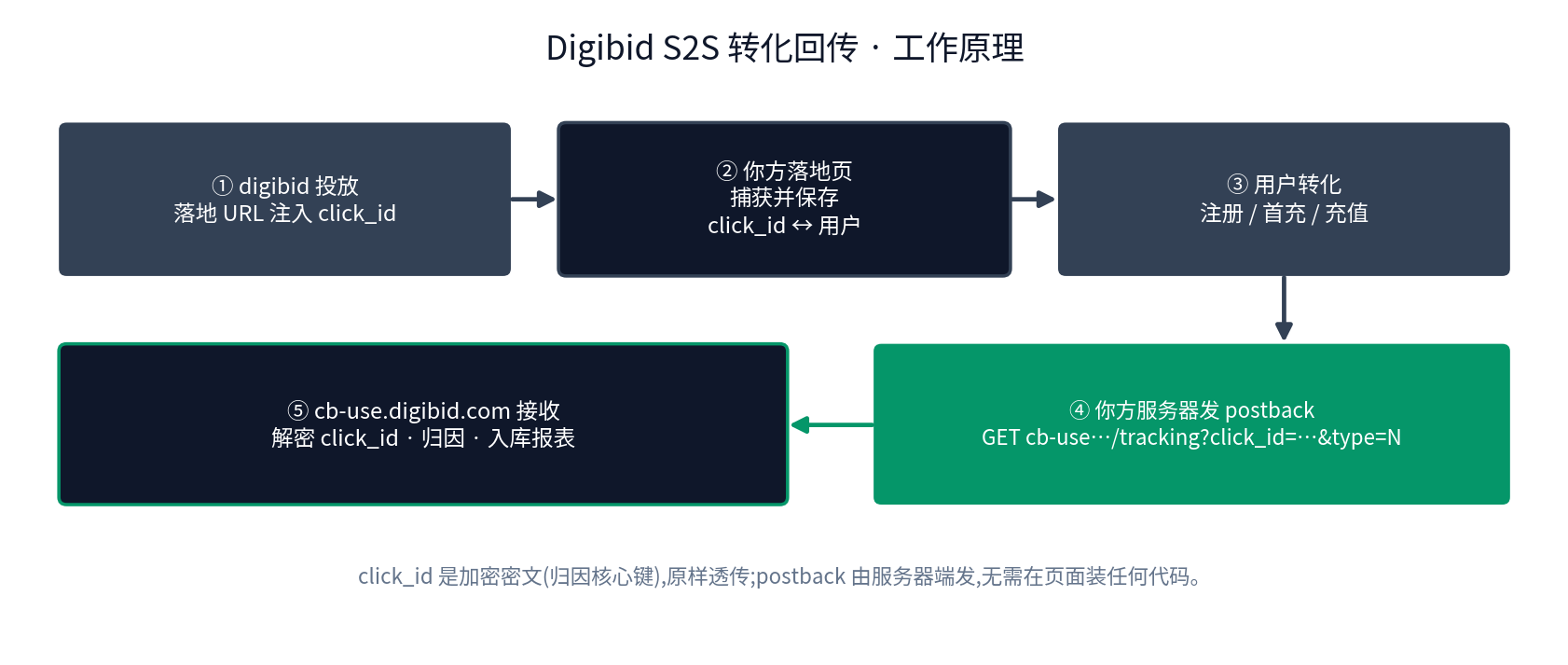
click_id is injected into the landing URL.click_id ↔ user.GET cb-use…/tracking?click_id=…&type=Nclick_id is encrypted ciphertext (the core attribution key) and must be passed through as-is; the postback is sent from your server, so no code needs to be installed on the page.
digibid injects click_id into the landing URL when serving, for example:
Landing URLhttps://yoursite.com/?click_id=${click_id}
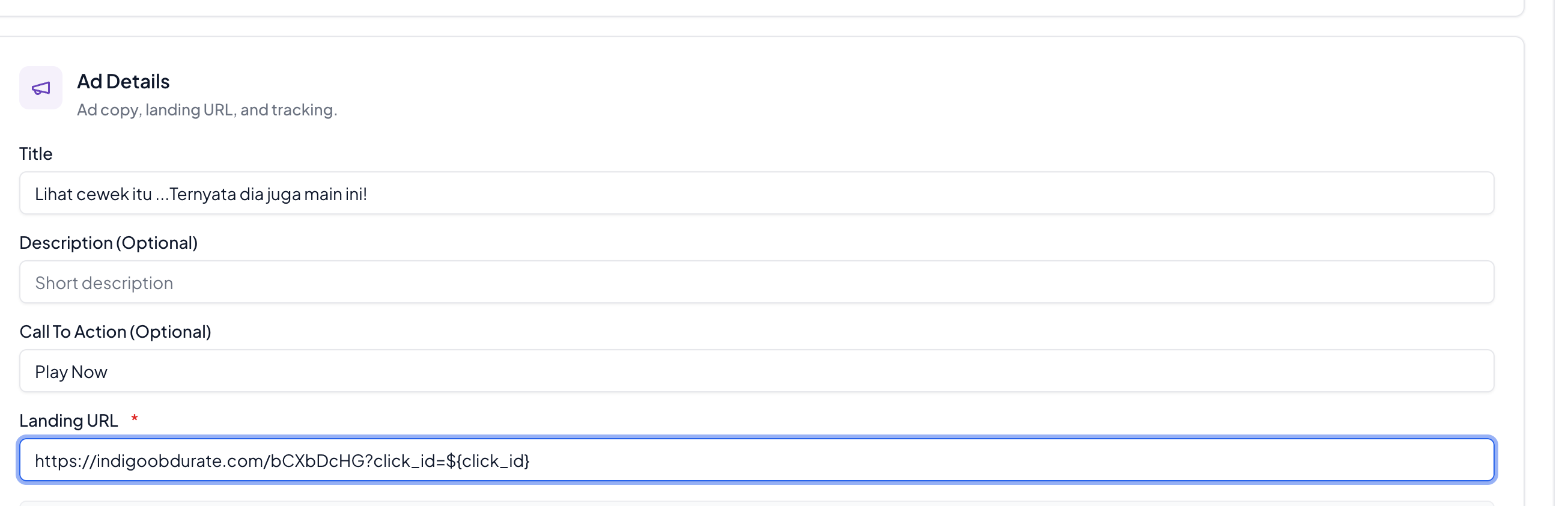
${click_id} macroOnce a conversion is confirmed, your server sends a request to the postback server (GET is sufficient, same endpoint as the pixel; POST is also supported):
RequestGET https://cb-use.digibid.com/tracking?click_id=<click_id>&type=&did=&ua=&ip=&adv_app_bundle=
Parameters:
| Parameter | Required | Description |
|---|---|---|
click_id | Recommended | The encrypted click ID carried on the landing URL — the core attribution key; pass it through as-is. If attribution fails, still post back all events, with click_id empty or omitted. |
type | Yes | Event code (see Section 4): 8 install / 12 registration / 13 deposit / 18 login / 19 first deposit / 17 reject |
event_id | Recommended | Unique event ID on your side; it must stay the same when the same real event is retried. |
did | Recommended | Device id, android id or ifa |
ua | Recommended | User Agent (url encode) |
ip | Recommended | IP address of the end user |
adv_app_bundle | Recommended | App bundle and related info of the advertised app; please include adv_app_bundle on every request. Custom field, max length 256. |
uid | Recommended | The end user's registration id in your system |
purchase | Required for deposits | Amount (when type=13/19), e.g. 9.9. |
currency | Optional | ISO 4217 currency code, default USD, e.g. BRL for Brazil; only reported together with an amount. |
_ | Optional | Cache-busting random value (e.g. a timestamp). Add it when the same user posts back the same kind of event multiple times, to make sure every request actually arrives. |
200 means the event was received.digibid uses numeric type codes for each layer of the conversion funnel (a different event is simply a different code — no need for goal=2/3 style layering as in some networks); the English / Chinese aliases in the table below are also accepted.
| Event | type | Aliases (also accepted) |
|---|---|---|
| Install / open | 8 | install / open |
| Registration | 12 | register / 注册 |
| Login | 18 | login / 登录 |
| First deposit (FTD) | 19 | firstpurchase / 首充 |
| Deposit (cumulative, total deposits) | 13 | purchase / recharge / 充值 / 总充值 |
| Install rejected | 17 | reject / 拒绝安装 |
HTTP# Install / open
GET https://cb-use.digibid.com/tracking?event_id=e123&click_id=<click_id>&type=8&adv_app_bundle=com.test.app&ip=1.1.1.1&did=ffc225f9-8ec7-45bc-90f0-c973398a4d1c&ua=Dalvik%2F2.1.0+%28Linux%3B+U%3B+Android+13%3B+Pixel+7+Build%2FTQ3A.230901.001%29
# Registration
GET https://cb-use.digibid.com/tracking?event_id=e123&click_id=<click_id>&type=12&adv_app_bundle=com.test.app&ip=1.1.1.1&did=ffc225f9-8ec7-45bc-90f0-c973398a4d1c&ua=Dalvik%2F2.1.0+%28Linux%3B+U%3B+Android+13%3B+Pixel+7+Build%2FTQ3A.230901.001%29
# Login
GET https://cb-use.digibid.com/tracking?event_id=e123&click_id=<click_id>&type=18&adv_app_bundle=com.test.app&ip=1.1.1.1&did=ffc225f9-8ec7-45bc-90f0-c973398a4d1c&ua=Dalvik%2F2.1.0+%28Linux%3B+U%3B+Android+13%3B+Pixel+7+Build%2FTQ3A.230901.001%29
# First deposit succeeded (with amount + currency)
GET https://cb-use.digibid.com/tracking?event_id=e123&click_id=<click_id>&type=19&purchase=9.9¤cy=BRL&adv_app_bundle=com.test.app&ip=1.1.1.1&did=ffc225f9-8ec7-45bc-90f0-c973398a4d1c&ua=Dalvik%2F2.1.0+%28Linux%3B+U%3B+Android+13%3B+Pixel+7+Build%2FTQ3A.230901.001%29
# Deposit succeeded (cumulative)
GET https://cb-use.digibid.com/tracking?event_id=e123&click_id=<click_id>&type=13&purchase=99.9¤cy=BRL&adv_app_bundle=com.test.app&ip=1.1.1.1&did=ffc225f9-8ec7-45bc-90f0-c973398a4d1c&ua=Dalvik%2F2.1.0+%28Linux%3B+U%3B+Android+13%3B+Pixel+7+Build%2FTQ3A.230901.001%29
Requirements:
click_id through as-is — do not truncate, decrypt, or re-encode its content;200 means the event was received.purchase (+ optional currency); for a first deposit, post back both type=19 and type=13.